qwitto
Book a demo
DevOps for MBSE

qAnalytics

Scaling MBSE - automation in systems engineering, built for SysML v1 and v2 teams.

Book a demo How it works
{{ heroDiagram }}

Model governance

How governance works
Immediate quality feedback

Every model change gets feedback right away, so issues never get the chance to accumulate.

Lifecycle management

A lightweight review mechanism gives you continuous control over the model lifecycle.

Lean configuration management

Enables baseline creation and model diffing, so every state is captured and comparable.

Project Lifecycle states Validation Changes Metrics Pipeline
State Reviews Findings 2w Users Status Last change
Battery UnitSysML v2 0 6 2 1 2mo
AirplaneEngineProfile 0 12 +34 5 now
Airplane Model 1 102 3 7 10d
Chassis 1 10 0 0 11mo
Drivetrain 0 7 +120 13 now
ElectricVehicle 0 4 0 0 6mo
Your tools
Requirements tool e.g. Polarion, Codebeamer REQ-042
MBSE tool e.g. Cameo, Rhapsody Block: Power system
Engineering tool e.g. Git, IDEs power_ctrl.c
qAnalytics — digital thread AI-maintained
REQ-042 Block: Power system power_ctrl.c
Creates Maintains Validates
qAnalytics dashboard — changes & inconsistencies reported

Digital Threads

Digital threads break down the tool, data, and information silos that many engineering organizations run into today. With qAnalytics, we connect your requirements, MBSE, and engineering tools along the development process — and let AI do what it's best at: connecting large data sets and keeping them in sync.

For example: when a requirement changes, the AI step finds the related elements in your MBSE tool, checks for inconsistencies and errors, and reports them on a dashboard.

Capabilities of qAnalytics

Eight capabilities, one continuous pipeline.

Stages run automatically on trigger events — commits, schedules, reviews, and more. Track every element as it moves through modification, review, and approval. Custom quality rules run automatically, with results the moment they happen. Four-eyes approval with a full, automatic audit trail. Create baselines for your MBSE models, and sync baselines from other models too. Continuous, customizable insight into model and pipeline health. Add custom stages — AI-driven or rule-based — that run automatically on pipeline events. Works with the tools your team already uses — Cameo, MagicDraw, Jira, Azure DevOps.
Pipelines

A MBSE pipeline: the automatic sequence every model change runs through.

Each change triggers a series of steps — quality, analysis, documentation, and more — that run automatically and in order, with no manual work required.

Pipeline stages
Synchronze MBSE changes Model changes come in automatically on every commit, sync, or scheduled run.
Done
Check model quality Quality rules run immediately, with errors and warnings visible right away.
Done
KPI dashboards Visualize your own modeling KPIs and analyze the trend.
Running
Custom stage Define your company specific automation, e.g., a requirements document generation.
Queued

Pipelines start on a commit or sync, a schedule, a manual run, or a review being approved or rejected — stages then run sequentially where order matters, or in parallel when checks are independent.

Lifecycle management

Know exactly where every element stands.

Every model element moves through a tracked lifecycle — so you always know what's changed, what's been reviewed, and what's ready.

Modified Element changes — a step that can't be reversed.
In review Sent for four-eyes approval.
Approved Reviewer accepts the change.

Current model state
Observe model quality at a glance, clearly and continuously and capture real-time feedback at every stage of the engineering lifecycle.

Compare progress
Detect progress, spot errors instantly to assign reviews. Improve faster to keep your integration pipeline error-free.
Sep 14 Sep 21

Trending over time
Identify trends in your system model and react immediately.
Quality checks

Continuous quality 

Validation runs automatically as part of the pipeline, checking every change against your own quality rules.

Commits
Fix power block interface
S. Keller · a3f9c1e · 14:22
+2 −1
Update battery capacity reqs
J. Novak · 7c21db4 · 11:05
+4 −3
Add sensor redundancy block
M. Ortiz · e58a02f · 09:47
+1
Refactor thermal interfaces
S. Keller · 1b76ffa · Yesterday, 16:30
−5
Sync requirements from Polarion
A. Becker · 4d9c3aa · Yesterday, 08:12
+3 −1
Erroneous elements — commit 7c21db4
PowerBlock_v2 — missing output port Error
BatteryCapacity — requirement not traced Warning
ThermalInterface — port type mismatch Error
SensorArray_Redundant — naming convention Info
PowerCtrl_Task — unconfirmed dependency Warning

Each commit shows how many validations it resolved and introduced; selecting one lists every erroneous element, filterable by error type, element type, and more.

Automated rule engine. Custom, company-defined rules run on every change, with errors, warnings, and info-level results visible immediately.
Configurable rule sets. Choose which rules apply per tool or per project, using either an include list or a whitelist-only mode.
Results & trends. Track validation results over time and diff between commits, so you can see exactly what a change introduced or resolved.
Reviews

Four eyes, full audit trail, zero guesswork.

Structured reviews bring a second set of eyes to model changes — with the full history captured automatically.

Assign review
Approved In review Modified — needs attention

Every element in the model is colored by its lifecycle state, so blind spots surface immediately: green is approved, yellow is in review, red is modified and needs attention — down to whatever depth you drill into.

Four-eyes workflow Reviews reference specific elements and issues, get assigned to a reviewer, and are resolved with an explicit accept or reject.
Comments & history Every review keeps a full discussion and status trail, so the reasoning behind a decision is never lost.
Reviews trigger pipelines Approving or rejecting a review can itself kick off further pipeline stages, closing the loop between decision and action.
Configuration management

Capture a baseline. Stay in sync.

qAnalytics gives you a lean configuration management approach for your MBSE models — so every state of the model is captured, comparable, and never lost.

v1.0 S. Keller Mar 3 · main
v1.1 J. Novak Apr 18 · main
v1.2 M. Ortiz Jun 9 · release/1.x
v2.0 A. Becker Aug 2 · main
v2.1 S. Keller Sep 20 · main Draft

Every baseline sits on the timeline with its version, author, date and branch — so you can always see exactly what was captured, when, and where it came from.

Create baselines Capture a baseline of your MBSE model at any point — a milestone, a release, or a scheduled snapshot — so you always have a clean state to compare against.
Sync external baselines Bring in baselines created outside qAnalytics and keep them in sync, so configuration management works across your toolchain — not just within one tool.
Dashboards & KPIs

See your system's health at a glance.

Continuous, up-to-date metrics keep your team ahead of problems instead of reacting to them.
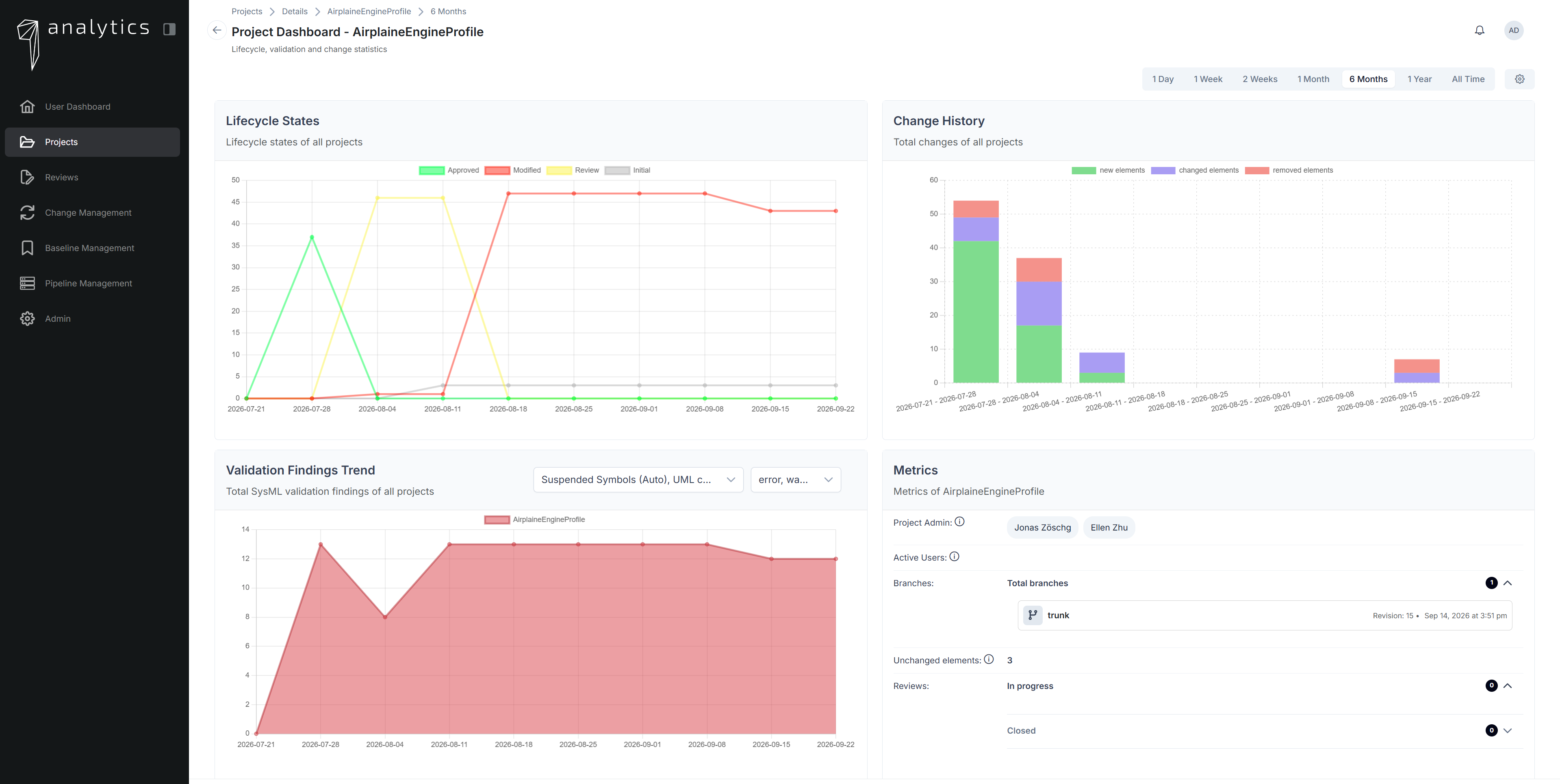
qAnalytics project dashboard showing lifecycle states, change history, validation findings trend, and project metrics over time

Lifecycle states, change history, and validation findings, all trended over a chosen time range — alongside project metrics like active users, branches, and open reviews.

Continuous insight. Live metrics on model quality, integration performance, and pipeline outcomes, all in one place.
Customizable KPIs. Dashboards tailored to the metrics that matter for your organization, not a fixed template.
Catch deviations early. Spot problems while they're small and localized, before they spread across the model.
AI stages

Extend your pipeline with MBSE AI Agents.

Beyond the default ingest and validation stages, add AI agents to the qAnalytics pipeline that handle open-ended MBSE work automatically. A few examples of what they can do:

Cross-check requirements against your FMEA to catch coverage gaps and inconsistencies automatically. Verify that every element stays traced end-to-end across your requirements, MBSE, and engineering tools. Validate models against your industry or company standards, and flag deviations the moment they appear. Compute and maintain the digital thread linking requirements, model elements, and code — kept current automatically.
Integrations

Works inside the tools your engineers already use.

qAnalytics plugs into your existing modeling and issue-tracking tools — no workflow disruption.

Modeling tools
Cameo Systems Modeler
MagicDraw
MagicDraw
Teamwork Cloud
Teamwork Cloud
Modeling languages
SysML
SysML v1
SysML v2
SysML v2
Project management & DevOps
Jira
Azure DevOps
Coming soon
IBM Engineering Rhapsody
PTC Codebeamer
Siemens Polarion
Deployment & security

Runs where your data lives — on your premises.

Built for organizations that need full control over where their engineering data lives.

Always on-premise Deployed at your site — never a shared, multi-tenant hosted service.
Authentication Internal accounts, LDAP, or OAuth2 — use what your organization already runs.
Access control Global and scoped roles and permissions, down to the project level.
Licensing Seat-based licensing with clear visibility into license status and active-user limits.
Company

Built on 9 years of hands-on MBSE experience.

Over the past 9 years, we've supported large engineering organizations — across automotive, aerospace, and medical technology — through every stage of MBSE adoption: methodology, tooling, modeling languages, and training.

qAnalytics was built directly from the problems we saw repeatedly in that work: model changes with no audit trail, quality issues surfacing too late, and no automated way to keep models and issues in sync.

Mission Bringing DevOps practices to model-based systems engineering.
qwitto engineers reviewing a model on screen together

See DevOps for MBSE in action.

Email us and we'll set up a short demo to show how your team's model changes could run through an automated, continuously validated pipeline.

Continuous feedback means fewer surprises at milestones — see how catching issues early translates into faster, higher-quality delivery.

Reach out to us at sales@qwitto.com
Email us